Most Airflow tutorials start with Astronomer — a commercial platform that wraps Airflow and gives you a managed local environment via astro dev start. That’s fine for convenience, but it hides how Airflow actually works. This post skips the wrapper and runs Airflow the way it runs in production: Docker Compose, the official image, and raw configuration.
By the end you’ll have a working ETL pipeline that fetches daily exchange rates from the ECB’s public API, transforms them, and loads them into PostgreSQL. Every component will be visible and understandable.
Table of contents
Open Table of contents
- What Airflow actually is
- Docker Compose setup (no Astronomer)
- DAGs as code
- The Airflow connections system
- The complete ETL DAG
- What each concept does
- Monitoring in the web UI
- Querying the loaded data
- Adding a sensor: wait for the API to be available
- Key operational gotchas
- Lessons from actually running it
- When NOT to use Airflow
- Related posts
What Airflow actually is
Before running anything, fix the mental model. Airflow is not a data processing engine — it does not move data. Airflow is a workflow orchestrator: it schedules Python functions, tracks whether they succeeded or failed, retries failures, and provides a UI for monitoring.
The actual data processing happens in your Python code. Airflow just decides when to run it and what to do if it breaks.
Three processes run simultaneously:
- Scheduler: Scans your
dags/folder continuously. When a DAG’s schedule triggers, it creates a DAG run and enqueues individual tasks. Does not execute tasks itself. - Webserver: Serves the UI on port 8080. Shows DAG structure, run history, task logs. Read-only from a data perspective.
- Worker: Executes the actual task Python code. With
LocalExecutor(what we’ll use), the scheduler itself spawns worker processes. WithCeleryExecutororKubernetesExecutor, workers run separately.
Everything — DAG runs, task instances, logs metadata, connection configs — is stored in a metadata database. PostgreSQL is the production choice. SQLite is the default (single-node, do not use in production).
Docker Compose setup (no Astronomer)
Create a project folder:
airflow-demo/├── dags/ # your DAG Python files go here├── logs/ # Airflow writes logs here├── plugins/ # custom operators (empty for now)└── docker-compose.ymlThe docker-compose.yml below runs three Airflow services plus two PostgreSQL instances — one for Airflow’s metadata, one for our data warehouse:
x-airflow-common: &airflow-common  image: apache/airflow:2.9.0  environment:    AIRFLOW__CORE__EXECUTOR: LocalExecutor    AIRFLOW__DATABASE__SQL_ALCHEMY_CONN: postgresql+psycopg2://airflow:airflow@airflow-postgres/airflow    AIRFLOW__CORE__FERNET_KEY: 'ZmDfcTF7_60GrrY167zsiPd67pEvs0aGOv2oasOM1Pg='    AIRFLOW__CORE__DAGS_ARE_PAUSED_AT_CREATION: 'true'    AIRFLOW__CORE__LOAD_EXAMPLES: 'false'    AIRFLOW__WEBSERVER__EXPOSE_CONFIG: 'true'    # dev only — never in production    AIRFLOW__SCHEDULER__DAG_DIR_LIST_INTERVAL: '30'    # Pre-register the data warehouse connection via env var — no CLI step needed.    # Naming convention: AIRFLOW_CONN_<CONN_ID_UPPERCASE>    AIRFLOW_CONN_DATA_WAREHOUSE: 'postgresql://warehouse:warehouse@data-warehouse:5432/rates_db'  volumes:    - ./dags:/opt/airflow/dags    - ./logs:/opt/airflow/logs    - ./plugins:/opt/airflow/plugins
services:  # Airflow metadata database  airflow-postgres:    image: postgres:15    environment:      POSTGRES_USER: airflow      POSTGRES_PASSWORD: airflow      POSTGRES_DB: airflow    volumes:      - airflow-db-data:/var/lib/postgresql/data    healthcheck:      test: ["CMD", "pg_isready", "-U", "airflow"]      interval: 5s      timeout: 5s      retries: 5
  # Our data warehouse — separate from Airflow internals  data-warehouse:    image: postgres:15    environment:      POSTGRES_USER: warehouse      POSTGRES_PASSWORD: warehouse      POSTGRES_DB: rates_db    ports:      - "5433:5432"    # expose on 5433 so we can query it directly    volumes:      - warehouse-db-data:/var/lib/postgresql/data    healthcheck:      test: ["CMD", "pg_isready", "-U", "warehouse", "-d", "rates_db"]      interval: 5s      timeout: 5s      retries: 5
  # Initialise the metadata DB and create admin user (runs once, then exits)  airflow-init:    <<: *airflow-common    entrypoint: /bin/bash    command:      - -c      - |        airflow db migrate && \        airflow users create \          --username admin \          --password admin \          --firstname Admin \          --lastname User \          --role Admin \          --email admin@example.com    depends_on:      airflow-postgres:        condition: service_healthy
  airflow-webserver:    <<: *airflow-common    command: webserver    ports:      - "8080:8080"    healthcheck:      test: ["CMD", "curl", "--fail", "http://localhost:8080/health"]      interval: 30s      timeout: 10s      retries: 5      start_period: 60s    depends_on:      airflow-postgres:        condition: service_healthy      airflow-init:        condition: service_completed_successfully    restart: unless-stopped
  airflow-scheduler:    <<: *airflow-common    command: scheduler    depends_on:      airflow-postgres:        condition: service_healthy      airflow-init:        condition: service_completed_successfully    restart: unless-stopped
volumes:  airflow-db-data:  warehouse-db-data:
Start everything:
# Create directories Airflow needs (fixes permission errors)mkdir -p dags logs plugins
# First run: init takes ~2 minutes to download images and set up the DBdocker compose up -d
# Watch the init container finishdocker compose logs -f airflow-init
# Once init exits cleanly, open http://localhost:8080# Login: admin / admin
The FERNET_KEY above is a valid key for local dev (generate a real one with python -c "from cryptography.fernet import Fernet; print(Fernet.generate_key().decode())" for production). Fernet encrypts connection passwords stored in the metadata DB.
Security note:
EXPOSE_CONFIG: 'true'makes the full Airflow configuration (including the Fernet key and connection strings) visible in the webserver UI under Admin → Configuration. It exists purely for local debugging — remove it in any internet-facing deployment.
DAGs as code
In Airflow, a DAG (Directed Acyclic Graph) is a Python file in the dags/ folder. The Scheduler scans this folder every 5 minutes by default (AIRFLOW__SCHEDULER__DAG_DIR_LIST_INTERVAL=300) and re-parses individual DAG files every 30 seconds (AIRFLOW__SCHEDULER__MIN_FILE_PROCESS_INTERVAL=30). Drop a valid Python file and it appears in the UI on the next scan cycle.
A DAG defines:
- What tasks to run (Python functions decorated with
@task) - In what order (using
>>dependency notation) - On what schedule (
schedule="0 8 * * *"= 8 AM daily) - From what start date (must be in the past for the DAG to trigger)
The modern Airflow API uses the TaskFlow paradigm (@task decorator). It replaced the older operator-based API (PythonOperator, PostgresOperator) for Python-centric workflows. Inputs and outputs flow directly between functions — no manual XCom push/pull boilerplate.
The Airflow connections system
Airflow stores connection details (host, port, database, credentials) in the metadata DB, addressable by a conn_id string. Your DAG code references connections by ID, not by hardcoded credentials. This separates config from code.
The compose file above already pre-registers the data_warehouse connection via environment variable — no manual step needed:
AIRFLOW_CONN_DATA_WAREHOUSE: 'postgresql://warehouse:warehouse@data-warehouse:5432/rates_db'Airflow’s naming convention: AIRFLOW_CONN_<CONN_ID_UPPERCASE>. An env var with that name overrides any DB-stored connection with the same conn_id, which makes this the cleanest approach for CI/CD and for demos where you want one place to edit credentials.
Two alternative approaches if you prefer to manage connections at runtime:
# Via CLI (persists in the metadata DB)docker compose exec airflow-scheduler airflow connections add \ --conn-type postgres \ --conn-host data-warehouse \ --conn-login warehouse \ --conn-password warehouse \ --conn-schema rates_db \ --conn-port 5432 \ data_warehouseOr through the UI: Admin → Connections → + Add a new record.
The complete ETL DAG
Create dags/ecb_exchange_rates.py:
"""ECB Exchange Rates ETL======================Fetches daily EUR/USD and EUR/GBP exchange rates from the ECB's publicSDMX REST API and loads them into PostgreSQL.
Schedule: Daily at 08:00 UTCSource: https://data-api.ecb.europa.euTarget: data_warehouse connection → exchange_rates table"""
from __future__ import annotations
from datetime import timedelta
import pendulumimport requests
from airflow.decorators import dag, taskfrom airflow.providers.postgres.hooks.postgres import PostgresHook

ECB_API = "https://data-api.ecb.europa.eu/service/data"CURRENCIES = ["USD", "GBP", "JPY"]

@dag(    dag_id="ecb_exchange_rates_etl",    description="Fetch ECB exchange rates and load into PostgreSQL",    schedule="0 8 * * 1-5",          # Weekdays only — ECB doesn't publish weekends    start_date=pendulum.datetime(2024, 1, 1, tz="UTC"),    catchup=False,                    # Don't backfill historical runs    max_active_runs=1,                # No parallel runs of the same DAG    default_args={        "retries": 3,        "retry_delay": timedelta(minutes=10),        "retry_exponential_backoff": True,        "email_on_failure": False,    },    tags=["ecb", "finance", "etl"],)def ecb_exchange_rates_etl():
    @task()    def create_table() -> None:        """Idempotently create the target table if it doesn't exist."""        hook = PostgresHook(postgres_conn_id="data_warehouse")        hook.run("""            CREATE TABLE IF NOT EXISTS exchange_rates (                date          DATE         NOT NULL,                currency_pair VARCHAR(10)  NOT NULL,                rate          NUMERIC(12, 6) NOT NULL,                source        VARCHAR(50)  NOT NULL DEFAULT 'ECB',                loaded_at     TIMESTAMPTZ  NOT NULL DEFAULT NOW(),                PRIMARY KEY (date, currency_pair)            );
            CREATE INDEX IF NOT EXISTS idx_exchange_rates_date                ON exchange_rates (date);
            CREATE INDEX IF NOT EXISTS idx_exchange_rates_pair                ON exchange_rates (currency_pair);        """)
    @task()    def fetch_rates(currency: str, **context) -> list[dict]:        """        Fetch daily rates from the ECB SDMX REST API.
        The ECB publishes rates with a one-business-day lag, so we fetch        the previous trading day's data on each morning run.
        Returns a list of records: [{"date": "2024-01-15", "currency_pair": "USD/EUR", "rate": 1.0876}]        """        logical_date = context["logical_date"]        date_str = logical_date.strftime("%Y-%m-%d")
        # ECB SDMX dataset: EXR = Exchange Rates        # Key format: frequency.currency.base.type.variation        url = (            f"{ECB_API}/EXR/D.{currency}.EUR.SP00.A"            f"?format=jsondata&startPeriod={date_str}&endPeriod={date_str}"        )
        response = requests.get(url, timeout=30)
        # ECB quirks on non-trading days (weekends/holidays):        #   - sometimes HTTP 404 with a JSON error body        #   - sometimes HTTP 200 with an EMPTY body (crashes .json())        #   - sometimes HTTP 200 with valid SDMX-JSON but empty `series`        if response.status_code == 404:            print(f"HTTP 404 for {currency} on {date_str} (no data available)")            return []
        response.raise_for_status()
        if not response.text.strip():            print(f"Empty response body for {currency} on {date_str} (non-trading day)")            return []
        try:            data = response.json()        except requests.exceptions.JSONDecodeError:            print(f"Non-JSON response for {currency} on {date_str}: {response.text[:200]!r}")            return []
        # SDMX-JSON structure: dataSets → series → observations        # Each observation key is a string index into the time dimension.        # Use .get() throughout — a malformed-but-parsable body shouldn't crash.        series_data = data.get("dataSets", [{}])[0].get("series", {})        if not series_data:            print(f"No data returned for {currency} on {date_str} (likely a holiday)")            return []
        series_key = next(iter(series_data))        observations = series_data[series_key].get("observations", {})        if not observations:            # Series record exists but ECB published no data for this day            print(f"No observations for {currency} on {date_str} (holiday or non-trading day)")            return []
        time_periods = data["structure"]["dimensions"]["observation"][0]["values"]
        records = [            {                "date": time_periods[int(idx)]["id"],                "currency_pair": f"{currency}/EUR",                "rate": float(values[0]),            }            for idx, values in observations.items()            if values and values[0] is not None     # skip null observations        ]
        print(f"Fetched {len(records)} record(s) for {currency}")        return records
    @task()    def load_rates(records: list[dict]) -> int:        """        Upsert exchange rate records into PostgreSQL.
        Uses ON CONFLICT DO UPDATE so re-running the DAG is safe — it will        overwrite the previous value for the same (date, currency_pair) key.
        Returns the number of rows loaded (useful for downstream sensors or alerts).        """        if not records:            print("No records to load — skipping")            return 0
        hook = PostgresHook(postgres_conn_id="data_warehouse")
        # hook.get_conn() returns a raw psycopg2 connection.        # `with conn:` is psycopg2's transaction context manager — it commits        # on clean exit and rolls back on exception. It does NOT close the        # connection; Airflow manages connection lifecycle per task instance.        conn = hook.get_conn()        with conn:            with conn.cursor() as cur:                cur.executemany(                    """                    INSERT INTO exchange_rates (date, currency_pair, rate)                    VALUES (%s, %s, %s)                    ON CONFLICT (date, currency_pair)                    DO UPDATE SET                        rate      = EXCLUDED.rate,                        loaded_at = NOW()                    """,                    [(r["date"], r["currency_pair"], r["rate"]) for r in records],                )
        print(f"Loaded {len(records)} record(s)")        return len(records)
    @task()    def verify_load(row_counts: list[int], **context) -> None:        """        Data-quality gate: logs how many records loaded across all currencies.
        Zero records on a weekday is expected for public holidays (New Year's Day,        Good Friday, etc.) — the ECB does not publish on those dates.  The        fetch_* tasks already handle every non-trading-day edge case defensively        (404, empty body, empty series), so a true API outage surfaces there as        an exception, not as an empty return.  We warn rather than fail here.        """        total = sum(row_counts)        logical_date = context["logical_date"]        day_label = logical_date.strftime("%A %Y-%m-%d")
        if total == 0:            if logical_date.weekday() >= 5:                print(f"No records loaded on {day_label} — weekend, expected.")            else:                print(f"No records loaded on {day_label} — likely a public holiday (ECB non-publishing day).")            return        print(f"Verification passed: {total} total records loaded")
    # -----------------------------------------------------------------------    # DAG structure: task wiring    # -----------------------------------------------------------------------
    table = create_table()
    # Fetch all currencies in parallel (no dependency between them)    fetch_tasks = [        fetch_rates.override(task_id=f"fetch_{currency.lower()}")(currency=currency)        for currency in CURRENCIES    ]
    # Load in parallel — each fetch feeds its own load    load_tasks = [        load_rates.override(task_id=f"load_{currency.lower()}")(records)        for currency, records in zip(CURRENCIES, fetch_tasks)    ]
    # table must exist before any fetch; all loads must pass before verify    table >> fetch_tasks    verify_load(load_tasks)

ecb_exchange_rates_etl()
Drop this file into dags/. The compose above already sets AIRFLOW__SCHEDULER__DAG_DIR_LIST_INTERVAL=30, so new DAGs appear in the UI within 30 seconds. The production default is 300 (5 minutes). Because catchup=False, the DAG won’t immediately try to backfill from January 2024.
What each concept does
@dag and @task — TaskFlow API
The @dag decorator turns a function into a DAG factory. The @task decorator turns a function into a task. TaskFlow infers dependencies from how return values flow between functions — load_tasks takes fetch_tasks as input, so Airflow knows fetch must run before load.
Before TaskFlow (Airflow 1.x), you’d write this as:
# Old operator approach — more verbose, requires manual XCom managementfetch_op = PythonOperator( task_id='fetch_usd', python_callable=fetch_rates, op_kwargs={'currency': 'USD'},)load_op = PythonOperator( task_id='load_usd', python_callable=load_rates,)fetch_op >> load_opTaskFlow hides the XCom push/pull (Airflow’s inter-task data passing mechanism) behind normal function return values. Under the hood, each @task return value is serialized to the metadata DB as an XCom entry. Keep return values small — if a task produces a 1 GB DataFrame, write it to S3/GCS and pass the path, not the data.
catchup=False and start_date
Every Airflow DAG needs a start_date. If catchup=True (the default), Airflow will immediately schedule all runs from start_date to now. With start_date=pendulum.datetime(2024, 1, 1) and catchup=True, you’d get ~300 queued runs on first activation. Always set catchup=False unless backfilling is intentional.
retries and exponential backoff
External APIs fail transiently. With "retries": 3 and "retry_exponential_backoff": True, Airflow retries failed tasks at intervals that double each time (10m → 20m → 40m). The task is only marked failed after all retries are exhausted, at which point the DAG run is also marked failed.
Upsert pattern (ON CONFLICT DO UPDATE)
The load task uses an upsert rather than a plain INSERT. This makes the pipeline idempotent: running it twice for the same date produces the same result in the database, no duplicates. In any ETL pipeline, idempotency is not optional — network blips, infrastructure failures, and manual reruns all mean your pipeline will run more than once against the same data.
PostgresHook vs PostgresOperator
PostgresOperator runs a static SQL string. PostgresHook gives you a live connection object — use it when you need Python logic between SQL calls, when you want parameterised queries, or when you’re doing bulk operations with executemany. For this ETL, the hook is the right choice.
Monitoring in the web UI
Open http://localhost:8080. After the DAG is enabled (toggle the pause switch), you’ll see:
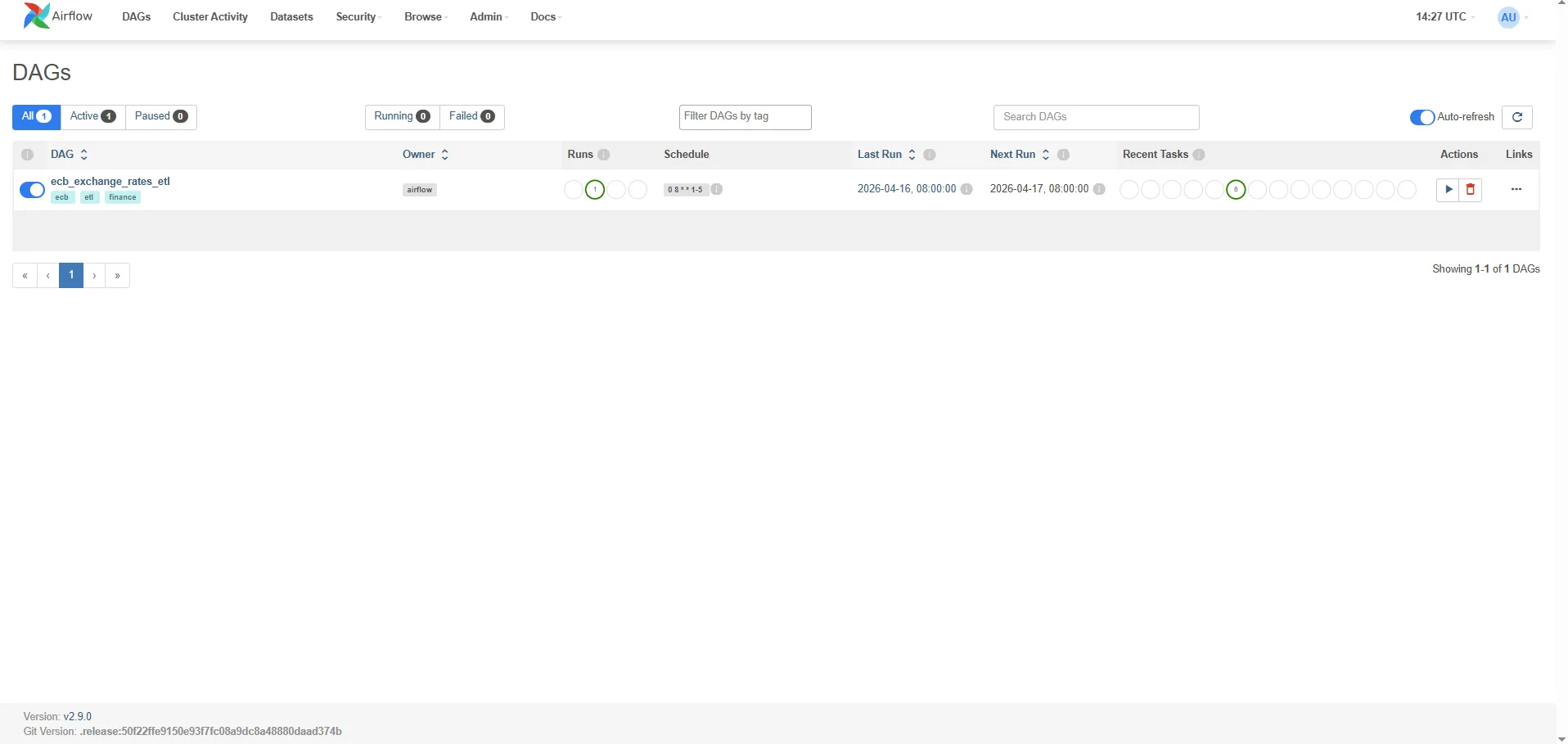
Grid view: A matrix of task instances × DAG runs. Green = success, red = failed, yellow = running. Click any cell to see the task’s log output.
Graph view: The DAG’s dependency graph rendered visually. Each node is a task, edges show dependencies. The parallel fetch tasks appear side by side.
Task logs: Every task writes stdout to a log file under ./logs/. The UI streams these in real time. The print() calls in the fetch and load tasks appear here.
Gantt chart: Shows task execution times side by side. Immediately reveals if one task is blocking others.
To manually trigger a run outside the schedule: DAG page → Trigger DAG (play button). To backfill a specific date range:
docker compose exec airflow-scheduler airflow dags backfill \ --start-date 2024-01-01 \ --end-date 2024-01-31 \ ecb_exchange_rates_etlQuerying the loaded data
Connect directly to the data warehouse on port 5433:
psql -h localhost -p 5433 -U warehouse -d rates_db-- Latest rates for all currenciesSELECT date, currency_pair, rateFROM exchange_ratesORDER BY date DESC, currency_pairLIMIT 20;
-- Daily USD/EUR rate for the past monthSELECT date, rateFROM exchange_ratesWHERE currency_pair = 'USD/EUR' AND date >= NOW() - INTERVAL '30 days'ORDER BY date;
-- Simple moving averageSELECT date, currency_pair, rate, AVG(rate) OVER ( PARTITION BY currency_pair ORDER BY date ROWS BETWEEN 4 PRECEDING AND CURRENT ROW ) AS rate_5d_avgFROM exchange_ratesORDER BY date DESC, currency_pair;Adding a sensor: wait for the API to be available
Sensors are tasks that poll a condition before proceeding. The scheduler pokes the sensor at a fixed interval; once the condition is met, the downstream tasks run. Useful when an upstream system publishes data at variable times.
@task.sensor(poke_interval=300, timeout=3600, mode="reschedule")def wait_for_ecb_api() -> bool: """ Poke the ECB API health endpoint every 5 minutes. mode='reschedule' frees the worker slot between pokes (vs. 'poke' which blocks). """ response = requests.get( "https://data-api.ecb.europa.eu/service/data/EXR/D.USD.EUR.SP00.A" "?format=jsondata&startPeriod=2024-01-02&endPeriod=2024-01-02", timeout=10, ) return response.status_code == 200Wire it before the fetch tasks: wait_for_ecb_api() >> fetch_tasks.
Use mode="reschedule" rather than the default mode="poke". In poke mode, the task occupies a worker slot for the entire timeout duration. In reschedule mode, the worker slot is freed between pokes — essential when you have many sensors running simultaneously.
Key operational gotchas
1. The Scheduler parses DAGs continuously. Any import-time error in a DAG file (a bad import, a syntax error) shows up as a “DAG import error” in the UI. It does not crash the scheduler, but the DAG won’t run.
2. The metadata DB is not a data store. XCom values, logs, and run history accumulate without bound. Run airflow db clean periodically — and because shell date arithmetic is not portable across Windows/macOS/Linux, the safest pattern is to invoke it inside the container:
docker compose exec airflow-scheduler bash -c \ 'airflow db clean --clean-before-timestamp "$(date -u -d "90 days ago" +"%Y-%m-%dT%H:%M:%S%z")" --yes'For log retention specifically, there is no single env var — remove old log files via filesystem cleanup (cron on the log volume) or configure remote logging with lifecycle rules on the object store.
3. start_date must be static. A common mistake: start_date=datetime.now(). This causes the DAG to perpetually have no scheduled runs because start_date shifts every time the Scheduler parses the file. Always use a fixed past date.
4. Task isolation. Each task runs in a separate process (with LocalExecutor) or container (with KubernetesExecutor). There is no shared in-memory state between tasks — hence XCom for small values, external storage for large ones.
5. Timezone handling. Airflow internally uses UTC. pendulum.datetime(2024, 1, 1, tz="UTC") is explicit and correct. datetime(2024, 1, 1) is timezone-naive and will cause subtle scheduling bugs if your system clock is not UTC.
Lessons from actually running it
Three specific things tripped me up when the DAG first went live, all of them generalisable to any public-API ETL:
1. catchup=False does not mean “no runs at all”
catchup=False disables backfilling of historical intervals, but Airflow still schedules one run for the most recent completed interval as soon as the DAG is unpaused. With start_date=pendulum.datetime(2024, 1, 1) and schedule="0 8 * * 1-5" activated on a Friday afternoon, Airflow immediately creates a scheduled__<last_weekday>T08:00:00 run. This is almost always what you want — but it’s easy to mistake for a “ghost” backfill.
2. Manual triggers use the trigger time as logical_date
When you click “Trigger DAG” in the UI (no config), Airflow uses datetime.utcnow() as the logical_date. If you happen to click it on a Sunday, the DAG will query the ECB API for Sunday’s data and get back an empty response. The task succeeds (thanks to the non-trading-day handler) but the warehouse stays empty, which is confusing if you don’t know why.
To trigger for a specific weekday:
| Airflow 2.x | Airflow 3.x |
|---|---|
airflow dags trigger <dag_id> -e 2026-04-17T08:00:00+00:00 | airflow dags trigger <dag_id> --logical-date 2026-04-17T08:00:00+00:00 |
Or in the UI: Trigger DAG w/ config → set the Logical date field.
3. External APIs return invalid JSON on “no data” conditions
The ECB API’s behaviour for non-trading days is a small-scale version of a trap many public APIs set:
- Sometimes it returns HTTP 200 with an empty body —
response.raise_for_status()is happy, butresponse.json()crashes withJSONDecodeError: Expecting value: line 1 column 1 (char 0). - Sometimes it returns HTTP 404 with a JSON error payload.
- Sometimes it returns HTTP 200 with valid SDMX-JSON where the
seriesobject is empty.
The fetch_rates task above handles all three cases explicitly. The general principle: never call .json() on a response without first checking the status code and that the body is non-empty. When integrating with any public API, add defensive parsing before you add retries — retries won’t help you decode an empty string.
4. airflow dags backfill is synchronous
The backfill CLI command blocks your terminal until every task for every date completes. With max_active_runs=1, this is serial. If you’re testing multiple dates and want to keep your terminal responsive, use async triggers (one command per date) instead:
for d in 2026-04-15 2026-04-16 2026-04-17; do docker compose exec airflow-scheduler airflow dags trigger ecb_exchange_rates_etl -e ${d}T08:00:00+00:00doneBackfill is still the right tool for large date ranges in production — just be aware that watching the CLI feels like watching paint dry.
5. verify_load fails on public holidays during backfill
Symptom: a backfill against a date range that includes New Year’s Day, Good Friday, or any ECB non-publishing weekday exits with ValueError: No exchange rate records loaded on a trading day.
Cause: the original verify_load only bypassed the check for calendar weekends (weekday() >= 5). Public holidays fall on weekdays, so 1 January (Thursday) or 3 April 2026 (Good Friday) pass the weekend check and hit the raise ValueError.
Why this is a design mistake: the fetch_rates tasks already handle every non-trading-day edge case — HTTP 404, empty body, empty SDMX series — and return [] for all of them. A true API outage surfaces as an exception inside fetch_rates, not as a clean empty return. So verify_load receiving [0, 0, 0] means the API responded correctly and simply had no data, not that anything is broken.
Fix applied: verify_load now logs a warning for zero-record weekdays instead of raising. The quality gate still catches any partial load where some currencies succeed and others fail — that case produces a non-zero total and is handled correctly.
6. Docker Desktop needs breathing room
Airflow (scheduler + webserver) + PostgreSQL metadata + PostgreSQL warehouse = five long-running containers. The default Docker Desktop memory limit of 2 GB causes intermittent 500 errors from the Docker Engine pipe when the backfill command spikes CPU. Set Settings → Resources → Memory ≥ 4 GB before running anything Airflow-shaped locally.
When NOT to use Airflow
Airflow adds significant operational overhead: three processes to run, a metadata DB to maintain, YAML/code to write for every pipeline. The payoff is justified when you have:
- Multiple interdependent pipelines that need ordering guarantees
- Tasks that need retry logic with alerting
- Long-running pipelines where progress visibility matters
- Teams that need to inspect, rerun, and audit pipeline history
It is overkill for:
- Simple scheduled jobs: A Python script in a cron job is easier to reason about than an Airflow DAG with one task.
- Streaming pipelines: Airflow is batch-oriented. For continuous data flows, use Kafka + Faust/Flink or a purpose-built streaming platform.
- Purely in-process ETL: If you’re loading 10K rows from a CSV daily, a Python script with
pg8000and a GitHub Actions cron is operationally simpler. - Small teams with no data engineering background: The learning curve is real. Prefect, Dagster, and Mage.ai have better developer ergonomics for teams without dedicated platform engineers.
Related posts
- Migrating Apache Airflow 2.x to 3.2 — A Real Project Walkthrough — the follow-up post on upgrading the stack in this tutorial from Airflow 2.9 to 3.2, including the new
api-server/dag-processor/ JWT architecture - Apache Superset — Visualizing Your Airflow + PostgreSQL Pipeline in a Live Dashboard — the same ECB exchange rate data, but now queried through a dashboard
- Financial Time Series Validation — QA Lessons from a European Central Bank Platform — the validation pipeline that runs on data after it’s been loaded by pipelines like this one
- Python Time Series at Scale — Lessons from Processing 400M Financial Records — what happens when the volume exceeds what a daily ETL can handle
- MongoDB Aggregation Pipelines — The Query Language for Event-Driven Data — an alternative storage layer for when relational schemas aren’t the right fit