Apache Airflow 3.0 shipped in April 2025. Most teams are still on 2.x — release notes are easy to find but end-to-end migration walkthroughs with real failures are not. This post takes the ECB exchange-rate ETL from my earlier Airflow post and migrates it from 2.9.0 to 3.2.0, documenting every breaking change and every operational gotcha that actually came up during testing.
If you haven’t read the original post, this one assumes the baseline Docker Compose setup: Airflow 2.9, two PostgreSQL services (metadata + data warehouse), LocalExecutor, a TaskFlow DAG that fetches EUR exchange rates from the ECB SDMX REST API.
Table of contents
Open Table of contents
- Should you migrate now?
- What 3.x actually changes
- Docker Compose: side-by-side
- DAG code changes
- Environment variable renames
- CLI flag renames
- Installing providers
- Running it
- The UI changed too
- Gotchas actually encountered during migration
- Gotcha 1:
airflow users createfailed with “No auth manager configured” - Gotcha 2: Deprecation warning on every CLI call
- Gotcha 3: Unique constraint violation when re-triggering a date
- Gotcha 4: DAG doesn’t appear in the UI
- Gotcha 5: Scheduler health endpoint is on a different port
- Gotcha 6: Inter-service calls 401 / 403
- Gotcha 7: Docker Desktop memory pressure
- Gotcha 1:
- Companion project
- What I’d do differently next time
- Related posts
Should you migrate now?
Practical criteria, not preferences:
- Greenfield projects → start on 3.x. No debate. 2.x is in maintenance mode.
- Existing 2.x stacks in production → plan the migration for your next quarterly maintenance window. Airflow 2.x has an end-of-life date; staying behind costs you more the longer you wait.
- DAGs using deprecated features heavily (SubDagOperator,
execution_date,schedule_intervalkwarg, legacyDatasetAPI) → budget real DAG rewrite time, not just infra time. - Provider-heavy pipelines (Snowflake, Databricks, AWS S3, etc.) → check each provider’s 3.x support matrix before migrating. A few providers had longer gaps between 3.0 release and production-ready 3.x versions.
For a tutorial project like this one, the migration is a weekend job. For a real production environment with 100+ DAGs, it’s a sprint.
What 3.x actually changes
Six structural shifts, in rough order of how much they’ll affect your Docker Compose file:
1. The scheduler no longer parses DAG files
In 2.x the scheduler did both: scheduled DAG runs and parsed DAG files to know which DAGs exist. In 3.x these are separated — a new dag-processor service is responsible for reading the dags/ folder and writing serialised DAGs to the metadata DB. The scheduler reads those serialised DAGs and schedules runs.
This means your stack grows by one service. Without a dag-processor running, new DAGs simply won’t appear in the UI.
2. webserver is now api-server
The command is renamed. Same port 8080, same admin UI, but the service also exposes a new /execution/ REST endpoint that every other Airflow service calls over HTTP. This is the foundation of the Task SDK — tasks can now run without direct database access, which is what enables remote executors (Edge Executor, Kubernetes Executor in pod-per-task mode) to run untrusted code safely.
3. JWT-signed inter-service authentication
Because services now talk to the api-server over HTTP (instead of writing directly to the metadata DB), there’s a new authentication layer: each inter-service call is signed with a JWT using AIRFLOW__API_AUTH__JWT_SECRET. If this secret is missing or differs between services, the scheduler can’t report task state to the api-server and the whole system deadlocks silently.
4. The triggerer is now a standard service
triggerer existed in 2.x but was optional (only needed if you used deferrable operators). In 3.x it’s part of the standard compose — the standard airflow init entrypoint expects it. You can run without it if you genuinely have no deferrable tasks, but the reference compose includes it.
5. FAB auth is no longer the implicit default
In 2.x, Flask-AppBuilder was the authentication manager unless you configured otherwise. In 3.x you must explicitly set:
AIRFLOW__CORE__AUTH_MANAGER=airflow.providers.fab.auth_manager.fab_auth_manager.FabAuthManagerAnd the FAB provider itself (apache-airflow-providers-fab) may not be in the default image — install it explicitly.
6. The default image is leaner
The 3.x apache/airflow:3.2.0 image ships fewer pre-installed providers than the 2.9 version did. apache-airflow-providers-postgres specifically is not guaranteed to be present. For a demo you can install it at boot via _PIP_ADDITIONAL_REQUIREMENTS; for production you build a custom image once and pin it.
Docker Compose: side-by-side
Airflow 2.9 (5 services)
x-airflow-common: &airflow-common  image: apache/airflow:2.9.0  environment:    AIRFLOW__CORE__EXECUTOR: LocalExecutor    AIRFLOW__DATABASE__SQL_ALCHEMY_CONN: postgresql+psycopg2://airflow:airflow@airflow-postgres/airflow    AIRFLOW__CORE__FERNET_KEY: '<fernet>'    AIRFLOW__WEBSERVER__EXPOSE_CONFIG: 'true'    AIRFLOW__SCHEDULER__DAG_DIR_LIST_INTERVAL: '30'    AIRFLOW_CONN_DATA_WAREHOUSE: 'postgresql://warehouse:warehouse@data-warehouse:5432/rates_db'  volumes: [./dags:/opt/airflow/dags, ./logs:/opt/airflow/logs, ./plugins:/opt/airflow/plugins]
services:  airflow-postgres: { image: postgres:15, ... }  data-warehouse:   { image: postgres:15, ports: ["5433:5432"], ... }  airflow-init:     { <<: *airflow-common, command: [bash, -c, "airflow db migrate && airflow users create ..."] }  airflow-webserver:{ <<: *airflow-common, command: webserver, ports: ["8080:8080"] }  airflow-scheduler:{ <<: *airflow-common, command: scheduler }
Airflow 3.2 (7 services)
x-airflow-common: &airflow-common  image: apache/airflow:3.2.0  environment:    AIRFLOW__CORE__EXECUTOR: LocalExecutor    # NEW: must be set explicitly    AIRFLOW__CORE__AUTH_MANAGER: airflow.providers.fab.auth_manager.fab_auth_manager.FabAuthManager    AIRFLOW__DATABASE__SQL_ALCHEMY_CONN: postgresql+psycopg2://airflow:airflow@airflow-postgres/airflow    AIRFLOW__CORE__FERNET_KEY: '<fernet>'    # RENAMED: EXPOSE_CONFIG moved from [webserver] to [api] section    AIRFLOW__API__EXPOSE_CONFIG: 'true'    # RENAMED: DAG_DIR_LIST_INTERVAL moved from [scheduler] to [dag_processor].refresh_interval    AIRFLOW__DAG_PROCESSOR__REFRESH_INTERVAL: '30'    # NEW: JWT secret for inter-service auth. Same value across ALL services.    AIRFLOW__API_AUTH__JWT_SECRET: '<64-char-random-hex>'    # NEW: where non-api-server services POST task state updates    AIRFLOW__CORE__EXECUTION_API_SERVER_URL: 'http://airflow-apiserver:8080/execution/'    AIRFLOW_CONN_DATA_WAREHOUSE: 'postgresql://warehouse:warehouse@data-warehouse:5432/rates_db'    # NEW: the default image no longer guarantees FAB or Postgres providers    _PIP_ADDITIONAL_REQUIREMENTS: apache-airflow-providers-fab apache-airflow-providers-postgres  volumes: [./dags:/opt/airflow/dags, ./logs:/opt/airflow/logs, ./plugins:/opt/airflow/plugins]
services:  airflow-postgres:       { image: postgres:15, ... }  data-warehouse:         { image: postgres:15, ports: ["5434:5432"], ... }     # v3 uses 5434 on host (v2 uses 5433) so both can coexist  airflow-init:           { <<: *airflow-common, command: [bash, -c, "airflow db migrate && airflow users create ..."] }  airflow-apiserver:      { <<: *airflow-common, command: api-server, ports: ["8090:8080"] }   # was webserver; host 8090 (v2 uses 8080)  airflow-scheduler:      { <<: *airflow-common, command: scheduler }                           # no longer parses DAGs  airflow-dag-processor:  { <<: *airflow-common, command: dag-processor }                       # NEW  airflow-triggerer:      { <<: *airflow-common, command: triggerer }                           # NEW as standard service
Seven services instead of five. Every Airflow service shares the same AIRFLOW__API_AUTH__JWT_SECRET, enforced by keeping it in the x-airflow-common anchor.
DAG code changes
The DAG itself needs one defensive change. In 2.x, context["logical_date"] was always set. In 3.x it can be None for:
- Asset-triggered DAGs (no schedule at all)
- Manual triggers with no logical date explicitly passed
For our scheduled DAG, logical_date will always be set in practice — but defensive code is cheap:
logical_date = context["logical_date"]
# 3.x-safelogical_date = (    context.get("logical_date")    or context.get("data_interval_start")    or pendulum.now("UTC"))
Everything else in the DAG is unchanged: @dag, @task, PostgresHook, schedule, catchup, max_active_runs, upsert pattern, start_date=pendulum.datetime(...). The TaskFlow API stays stable across the version boundary.
Environment variable renames
Several env vars were renamed in 3.x. The old names still work but emit deprecation warnings on every CLI invocation:
| 2.x name | 3.x name |
|---|---|
AIRFLOW__WEBSERVER__EXPOSE_CONFIG | AIRFLOW__API__EXPOSE_CONFIG |
AIRFLOW__WEBSERVER__WEB_SERVER_HOST | AIRFLOW__API__HOST |
AIRFLOW__WEBSERVER__WEB_SERVER_PORT | AIRFLOW__API__PORT |
AIRFLOW__SCHEDULER__DAG_DIR_LIST_INTERVAL | AIRFLOW__DAG_PROCESSOR__REFRESH_INTERVAL |
The pattern is mostly consistent: server-facing things that lived under [webserver] moved to [api] (the api-server is now the HTTP entry point); DAG-parsing things that lived under [scheduler] moved to [dag_processor]. Auth-manager settings are a separate story — they landed under [fab] (or whichever auth manager you configure) rather than [api], so don’t assume every old [webserver] key maps to [api].
CLI flag renames
Commands that took the -e / --exec-date flag now take --logical-date:
| 2.x | 3.x |
|---|---|
airflow dags trigger <id> -e 2026-04-17T08:00:00+00:00 | airflow dags trigger <id> --logical-date 2026-04-17T08:00:00+00:00 |
airflow dags backfill --start-date … --end-date … <id> | unchanged (still --start-date / --end-date) |
--exec-date-upper-bound | --logical-date-upper-bound |
airflow tasks test <dag> <task> <date> kept the positional date argument in 3.x — no flag change there. The CLI rename only affected the commands that previously used -e / --exec-date. Your CI scripts and runbooks need updating accordingly.
Installing providers
The _PIP_ADDITIONAL_REQUIREMENTS env var tells the official entrypoint to pip install the listed packages at container startup:
_PIP_ADDITIONAL_REQUIREMENTS: apache-airflow-providers-fab apache-airflow-providers-postgresThis works but has two real costs:
- Slow boot. Every container installs the packages independently on every start. For a 7-service stack that’s 60–90 seconds per container × 7 containers on cold start.
- No reproducibility. You’re resolving versions at boot time against whatever the PyPI index has today.
For anything beyond a demo, build a custom image once:
FROM apache/airflow:3.2.0RUN pip install --no-cache-dir \ apache-airflow-providers-fab==2.4.1 \ apache-airflow-providers-postgres==6.2.0Then replace image: apache/airflow:3.2.0 with build: . in your compose file. Same boot cost once, then cached forever.
Running it
First docker compose up -d on the migrated stack:
docker compose up -d # 7 servicesdocker compose logs -f airflow-init # wait for migrations + user creationBoot time difference (local benchmarks on an M-series MacBook, 6 GB Docker VM):
| 2.9.0 | 3.2.0 | |
|---|---|---|
| Cold start (image pull + init) | ~60s | ~180s |
| Warm restart | ~15s | ~45s |
| Steady-state RSS (all containers) | ~1.6 GB | ~2.4 GB |
The boot time gap closes completely if you use a custom image with providers baked in (same ~60s as 2.x).
The UI changed too
The infrastructure is only half of the migration — the UI was rewritten from Flask + Bootstrap templates (Airflow 2.x) to a React SPA driven by the new api-server REST API (3.x). Same DAG, same data, but the visual experience is different enough that it’s worth seeing side by side.
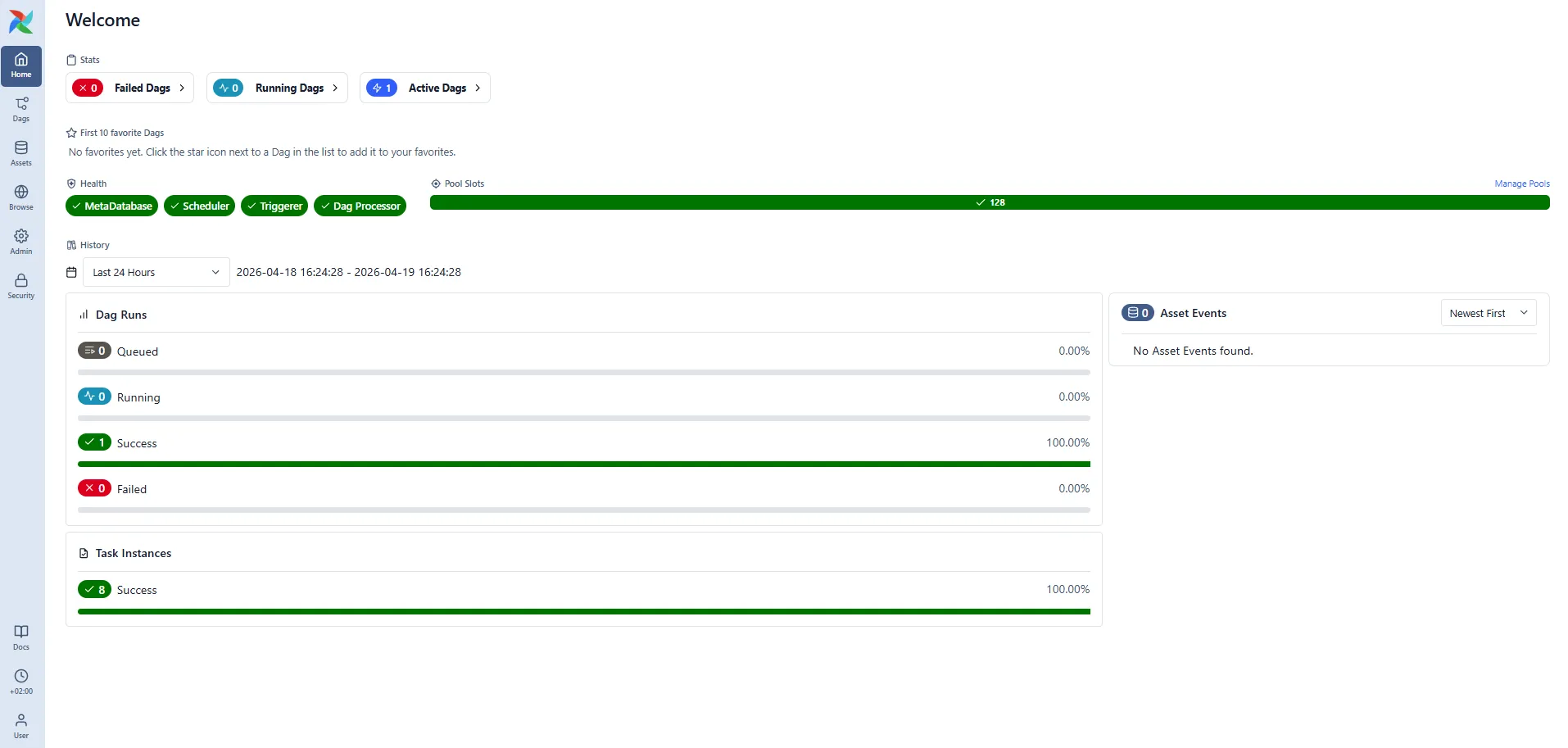
Here is the v3 Welcome dashboard at http://localhost:8090 after a successful cold start:
All three screenshots below were captured on the same day, same DAG (ecb_exchange_rates_etl), same data warehouse — only the Airflow version differs. v2 is on the left (http://localhost:8080), v3 on the right (http://localhost:8090, from the coexistence setup described in the Companion project section).
Landing page
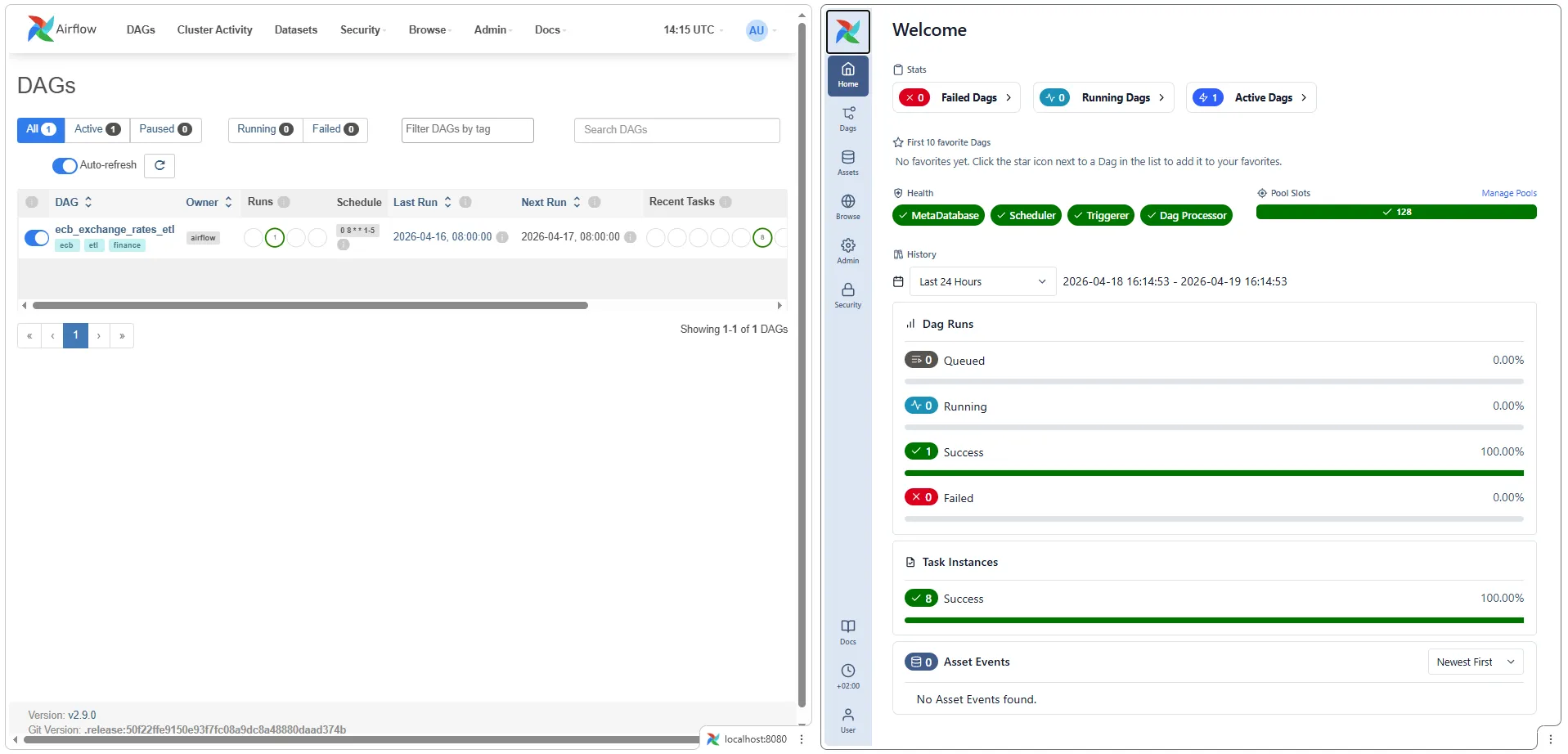
v2’s homepage is the DAGs list — a tabular view of every DAG, their schedule, next/last run, and pause state. You land on actionable data directly.
v3’s homepage is a new Welcome dashboard with:
- Stats cards (Failed / Running / Active DAGs)
- Health badges showing the live state of MetaDatabase, Scheduler, Triggerer, and Dag Processor — all the new-architecture services need to be green for the system to work end-to-end. This is the single best surface for diagnosing “why isn’t my DAG appearing” (answer: one of these badges is red).
- Pool Slots utilisation
- DAG Runs pie chart (Queued / Running / Success / Failed) with percentages
- Task Instances success rate over a configurable time window
- Asset Events feed — the new 3.x asset-based scheduling primitive
The DAGs list still exists in v3, but now lives under a separate “Dags” nav item. If your muscle memory expects to land on the table view, you’ll have to click once more.
Graph view
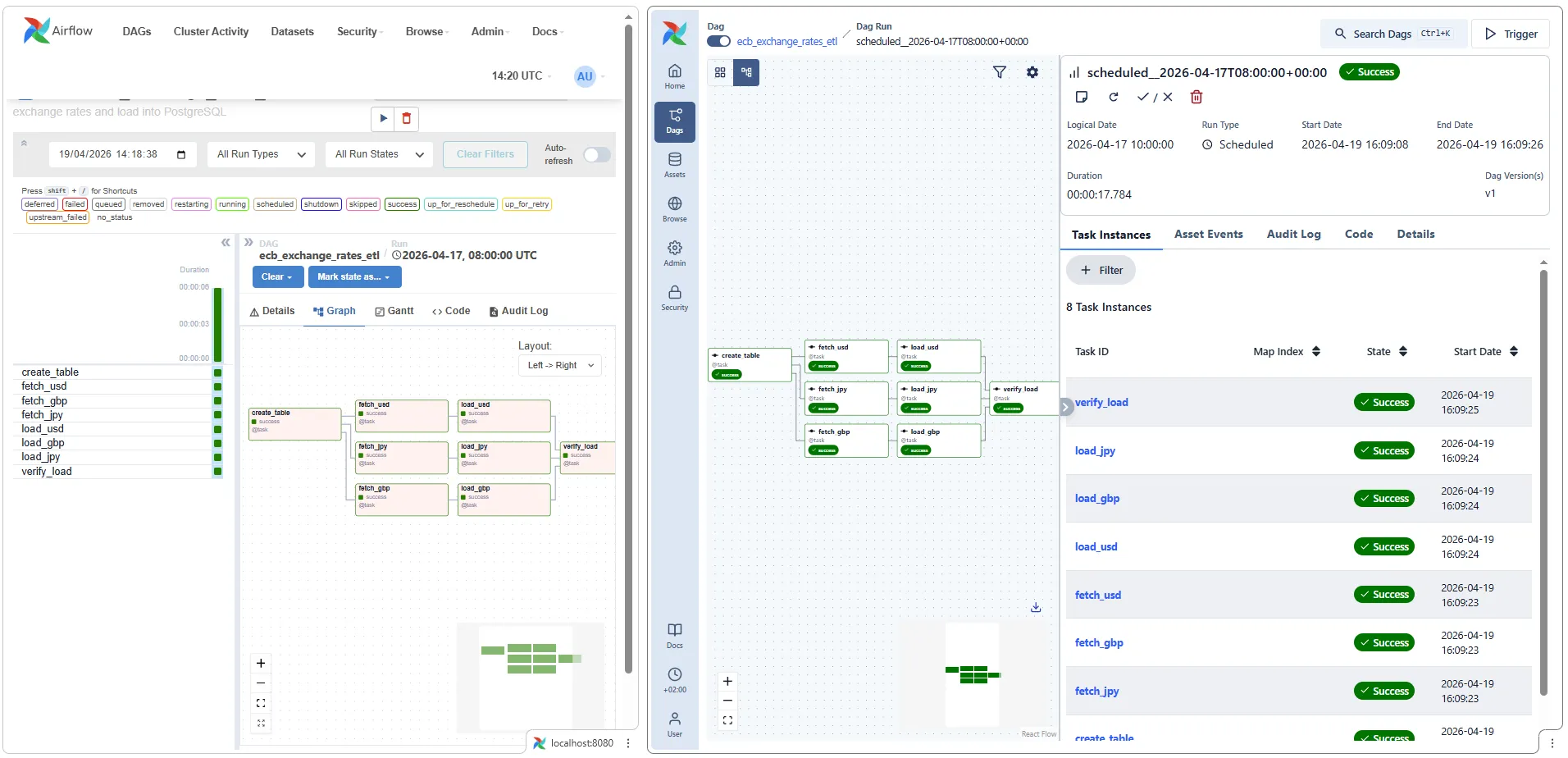
v2’s graph view is familiar: boxes with task names, colour-coded state, arrows for dependencies. Dense and functional.
v3’s graph view is a React-based redraw that prioritises the visual flow of the DAG over per-task metadata. Task names remain, dependency arrows become smoother, and the right-hand panel shows run context (Dag Run state, logical date, trigger type, duration). The Task Instances list is integrated into the right rail rather than a separate tab.
The underlying information is identical — what changed is the interaction model. v3 is optimised for “inspecting a run while it’s happening”; v2 is optimised for “reviewing a run after it finished”.
XCom inspector
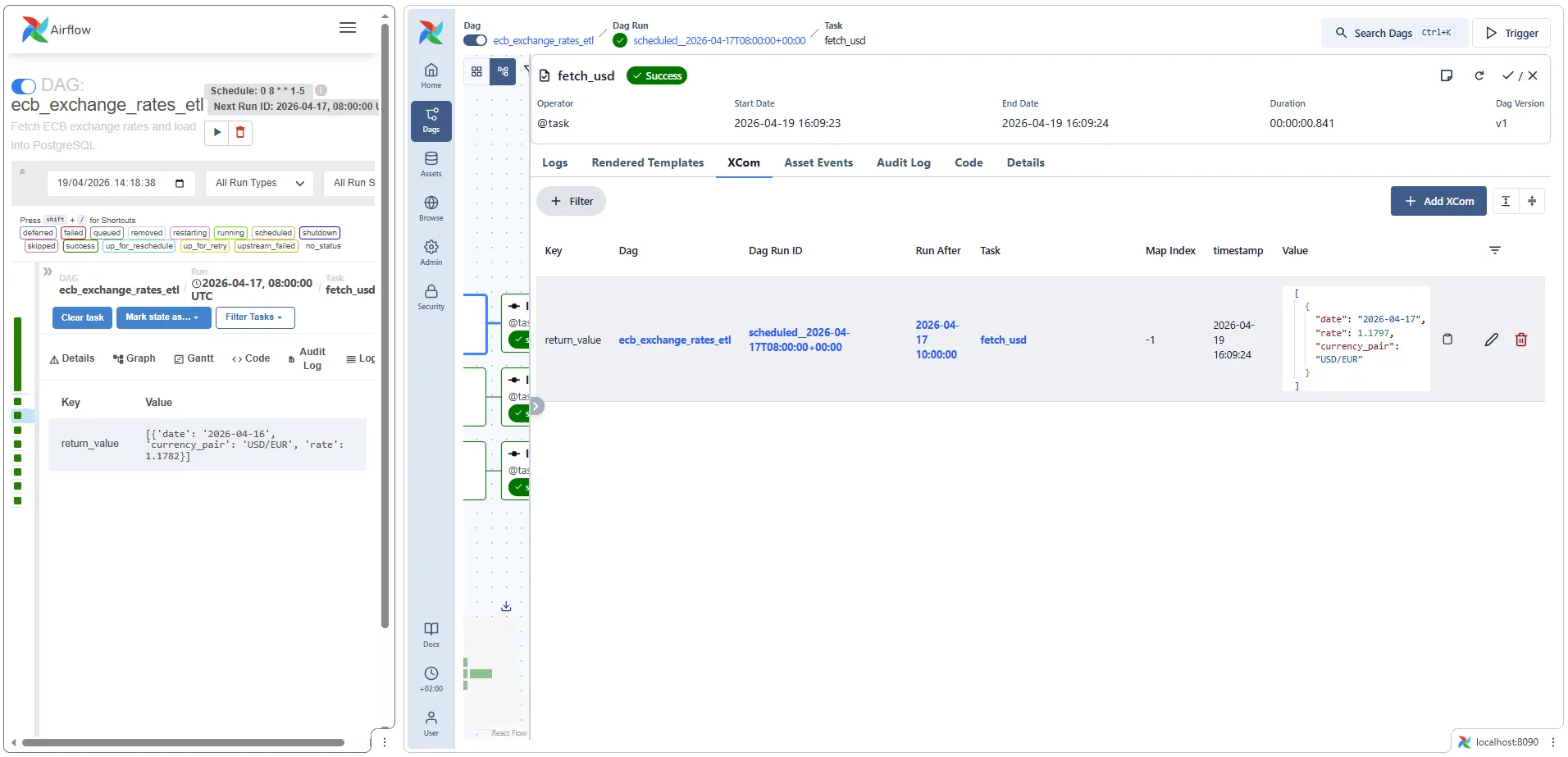
This is where the rewrite shows its most practical improvement. v2’s XCom tab is a two-column key/value table — the return_value for a task appears as a single row with a JSON-ish string in the value column, often truncated.
v3’s XCom viewer adds:
- Filter bar — useful when a task pushes dozens of XComs
- Pretty-printed JSON values with proper formatting
- Map Index column for dynamically mapped tasks (new in 2.3, but never had great UI support)
- Timestamp for each XCom write
- Per-row edit/delete actions
For debugging TaskFlow-heavy DAGs — which this ETL is — the v3 XCom viewer is genuinely better. The v2 view got you 80% of the way; the v3 view gets you to 100% without popping a SQL shell into the metadata DB.
Summary of the UI delta
| Aspect | v2 | v3 |
|---|---|---|
| Framework | Flask + Bootstrap server-rendered | React SPA against REST API |
| Landing page | DAGs list | Welcome dashboard with health + stats |
| Service health at a glance | Buried in Admin → Health | Front-page badges |
| XCom inspector | Key/value table | Filterable, JSON-formatted, per-row actions |
| Graph interaction | Static SVG, right-click menu | Interactive, integrated side panel |
| Log tailing | Auto-refresh toggle | Streaming by default |
Neither UI is strictly better for all workflows — v2 is faster for “grep-style” browsing of many DAGs because everything is a dense table; v3 is better for deep-diving into a single run or debugging XComs.
Gotchas actually encountered during migration
These are the things that broke in practice, in order.
Gotcha 1: airflow users create failed with “No auth manager configured”
Symptom: the init container exits with an error mentioning AUTH_MANAGER even though you set AIRFLOW__CORE__AUTH_MANAGER.
Cause: the FAB provider wasn’t installed yet (pip install runs at container startup but users create runs before it’s done), or _PIP_ADDITIONAL_REQUIREMENTS didn’t include apache-airflow-providers-fab.
Fix: include apache-airflow-providers-fab in _PIP_ADDITIONAL_REQUIREMENTS. And append || true to the users create command in the init script — re-running the init container on an already-initialised DB will otherwise fail on duplicate user.
Gotcha 2: Deprecation warning on every CLI call
Symptom:
The dag_dir_list_interval option in [scheduler] has been moved tothe refresh_interval option in [dag_processor] — the old setting hasbeen used, but please update your config.Cause: you kept the 2.x env var name.
Fix: rename AIRFLOW__SCHEDULER__DAG_DIR_LIST_INTERVAL → AIRFLOW__DAG_PROCESSOR__REFRESH_INTERVAL in your compose file. Recreate containers: docker compose up -d --force-recreate airflow-scheduler airflow-dag-processor airflow-apiserver airflow-triggerer.
Gotcha 3: Unique constraint violation when re-triggering a date
Symptom:
psycopg2.errors.UniqueViolation: duplicate key value violates uniqueconstraint "dag_run_dag_id_logical_date_key"DETAIL: Key (dag_id, logical_date)=(my_dag, 2026-04-17 08:00:00+00) already exists.Cause: this isn’t a 3.x-specific issue, but you hit it more often on a migrated stack because the dag-processor registers the DAG faster than in 2.x, and catchup=False auto-creates one run for the most recent scheduled interval. If you then manually trigger the same logical_date, the DB rejects the duplicate.
Fix: either pick a different date, or clear the existing run (re-queues all tasks without creating a new dag_run row):
docker compose exec airflow-scheduler airflow tasks clear <dag_id> \ --start-date 2026-04-17 --end-date 2026-04-17 --yesGotcha 4: DAG doesn’t appear in the UI
Symptom: you drop a file into dags/ and nothing shows up for minutes.
Cause (2.x): scheduler hasn’t scanned yet — wait up to DAG_DIR_LIST_INTERVAL.
Cause (3.x): you look at the scheduler logs for DAG parse errors. In 3.x, the scheduler doesn’t parse DAG files. Check the dag-processor logs:
docker compose logs airflow-dag-processor | grep -i errorGotcha 5: Scheduler health endpoint is on a different port
Symptom: your healthcheck against http://scheduler:8080/health fails — there’s nothing listening on 8080 in the scheduler container.
Cause: in 3.x the scheduler exposes its own lightweight health endpoint on port 8974 (separate from the api-server). AIRFLOW__SCHEDULER__ENABLE_HEALTH_CHECK defaults to true.
Fix: healthcheck command is curl --fail http://localhost:8974/health. The api-server stays on 8080 with a different path: /api/v2/monitor/health.
Gotcha 6: Inter-service calls 401 / 403
Symptom: scheduler logs show 401 Unauthorized or 403 Forbidden when calling http://airflow-apiserver:8080/execution/....
Cause: AIRFLOW__API_AUTH__JWT_SECRET is missing on one of the services, or different values on different services.
Fix: the secret must be identical on every Airflow service. The cleanest way is to define it once in the x-airflow-common anchor’s environment block and never override it per-service.
Gotcha 7: Docker Desktop memory pressure
Symptom: random 500 Internal Server Error from the Docker Engine pipe; containers restart unpredictably.
Cause: 7 Airflow services + 2 PostgreSQL services on a 2 GB Docker VM.
Fix: Docker Desktop → Settings → Resources → Memory ≥ 6 GB (up from 4 GB recommended for the 2.x stack). CPU ≥ 2.
Companion project
The two compose files live side-by-side in the GitHub repo so you can diff them directly:
personal-blog-projects/airflow-etl-ecb/— 2.9.0, 5 servicespersonal-blog-projects/airflow-etl-ecb-v3/— 3.2.0, 7 services
The DAG Python file is essentially identical between them, confirming that the migration is 95% infrastructure and 5% code.
Running all three stacks at once
All three projects in the companion repo have deliberately shifted host ports so they can run simultaneously on the same Docker host — v2 for standalone Airflow, v3 for the migrated stack, and the Superset project (which bundles its own Airflow v2 + Superset) for visualization:
| Resource | v2 project | v3 project | Superset project |
|---|---|---|---|
| Airflow UI | http://localhost:8080 | http://localhost:8090 | http://localhost:8081 |
| Superset UI | — | — | http://localhost:8088 |
| Data warehouse | localhost:5433 | localhost:5434 | localhost:5435 |
Everything else is automatically isolated by Docker Compose (container names, named volumes, networks are all prefixed by the parent folder name). The only real conflict was host port mappings, and those are now offset.
# Start v2 in one terminalcd airflow-etl-ecb && docker compose up -d#   → Airflow UI at http://localhost:8080, warehouse at localhost:5433
# Start v3 in another terminalcd ../airflow-etl-ecb-v3 && docker compose up -d#   → Airflow UI at http://localhost:8090, warehouse at localhost:5434
# Start the Superset project (Airflow v2 + Superset) in a third terminalcd ../superset-airflow-ecb && docker compose up -d#   → Airflow UI at http://localhost:8081, Superset at http://localhost:8088, warehouse at localhost:5435
For actual migration work you’d use this pattern to run the same DAG against both standalone stacks and compare — scheduler lag, task duration, UI behaviour under identical load. Bump Docker Desktop memory to ≥ 8 GB when all three are up (~20 containers combined).
What I’d do differently next time
If I were migrating a production stack, not a demo:
- Build a custom Airflow image first, before touching the compose. Pin every provider version. Run the image through CI so a provider dependency surprise doesn’t block migration day.
- Stand up the new stack alongside the old one on different ports and let them run in parallel for a week. Compare scheduler lag, task duration, and UI responsiveness under the same DAG load.
- Migrate DAGs in waves, starting with the least critical. Airflow 3 is strict about some patterns that 2.x allowed (naive datetimes in
start_date,SubDagOperator, etc.). The first DAG you migrate always surfaces the longest list of issues. - Keep the old cluster drainable for a rollback window. The metadata DB schema migration from 2.x to 3.x is one-way; if you discover a blocker after going live, rolling back means restoring from a pre-migration snapshot.
None of these are 3.x-specific — they’re the same rules that apply to any stateful infrastructure migration. The difference with Airflow is that the “stateful” part (the metadata DB) has a genuinely new schema, so the blast radius of a bad cutover is a DB restore, not a config rollback.
Related posts
- Apache Airflow ETL Demo — Scheduling Real Pipelines with PostgreSQL and No Abstractions — the original 2.9 project this migration is based on
- Apache Superset — Visualizing Your Airflow + PostgreSQL Pipeline in a Live Dashboard — the visualization layer on top of whichever Airflow version you end up running
- Financial Time Series Validation — QA Lessons from a European Central Bank Platform — downstream data-quality patterns that don’t care which orchestrator loaded the data